
The caller’s account opens when you pick up the phone
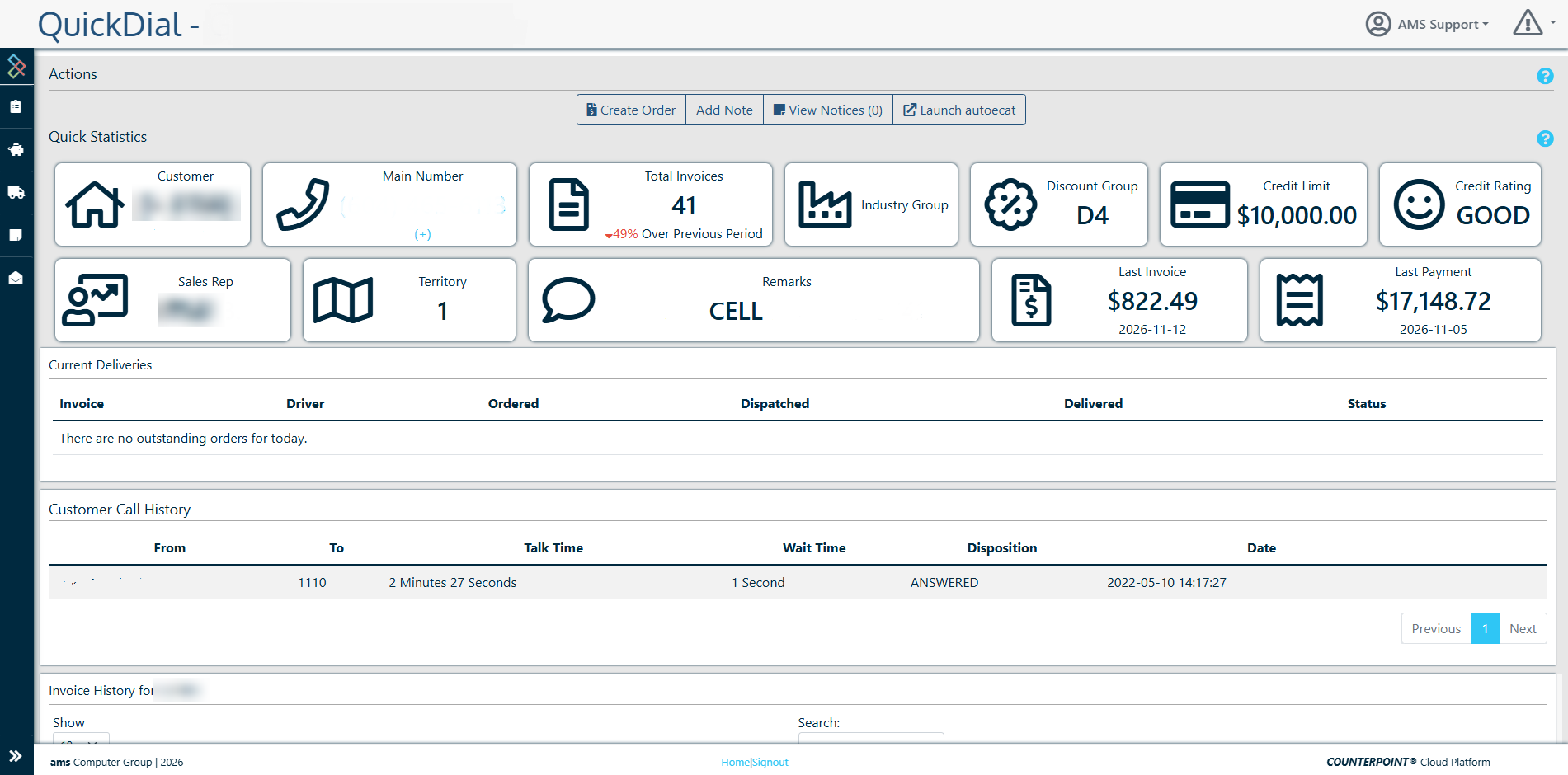
QuickDial is part of CP². When a clerk picks up the phone, it opens the caller’s account straight away: credit, last invoice, next delivery run, and what they usually buy. No “can I get your account number?”
No typing and no searching
QuickDial works with Counterpoint’s Connected Counter features and your phone system. The caller’s number goes to the CP² app on the clerk’s PC, and QuickDial opens on that caller’s account.
The phone rings
Your phone system passes the caller’s number through Counterpoint Connected Counter.
QuickDial opens the account
The CP² app on the clerk’s PC opens that customer’s QuickDial profile as the call connects.
The clerk sells
Everything needed to quote, invoice or answer “where’s my order?” is already on screen.
One match
The customer’s profile opens right away.
A shared number
When several accounts share a number, the clerk picks the right one from a short list of cards.
A number it doesn’t know
The clerk looks the customer up once and ticks a box to save the number. Next time, the account opens on its own.
What the clerk sees before saying hello
Quick Statistics tiles put the account on one screen. Clerks can switch between two tile sets: Delivery Runs and Customer Info.
Credit & account
- Account details and phone numbers
- Credit limit and credit rating
- Account remarks
- A warning if the account is on hold or disabled
Sales history
- Last invoice and last payment
- Month-to-date sales against the same period last year
- Sales rep and territory
- Industry group and discount group
Delivery & contact
- Main contact
- The customer’s local time
- Their next delivery run
From “hello” to invoice in one click
The Actions bar works as that customer, so nothing has to be looked up twice.
Create Order
Start an order for this caller in Counterpoint, for the right service branch.
Launch autoecat
If you use autoecat, open a catalogue session already signed in as this customer, so lookups and prices match their account.
Add and view notes
Notes are shared with CounterCRM, so sales reps and managers see what the counter heard.
Open messages
Read a customer’s open CounterMessage threads, or write a new one, without leaving the call.
The rest of the account is in the sidebar
When the caller asks about something specific, the answer is in the sidebar.
- Recent invoices and invoice lines: what they usually buy
- Deliveries, if you use jDispatch: where their order is
- Call history
- Catalogue activity, if you use autoecat
- Open CounterMessage threads
Moments your counter will recognize
The account on hold
A regular calls for a rush order. QuickDial shows the account is on hold before the clerk quotes, so the conversation about the balance happens now, not after the part has gone out.
“Where’s my order?”
The shop wants to know when their part arrives. One click on Deliveries shows the jDispatch status, and the next run time is already on screen.
A new clerk’s first day
The caller asks for “the usual”. The invoice lines show exactly what they buy, so the new clerk sounds like someone who’s been there 20 years.
The new mobile number
A shop owner calls from their cell for the first time. The clerk finds the account once and saves the number. From then on, QuickDial knows who it is.
Every clerk sounds like your best clerk
New staff get the same context as your veterans: what the customer buys, when their truck comes, and what was promised last time.
- Fewer orders quoted to accounts on hold
- Fewer “I’ll call you back with that”
- Notes and messages captured where the whole team can see them
- It learns your callers as clerks save new numbers
QuickDial can turn minutes into seconds on the counter.
Common questions about QuickDial
What do I need?
Counterpoint with Connected Counter, and the CP² desktop app on each clerk’s PC.
Does it work with my phone system?
QuickDial gets the caller’s number from your phone system through Counterpoint Connected Counter. Ask us about your setup. If you’re choosing a new phone system, we supply PBXact.
What if two accounts share a number?
The clerk picks the right account from a short list.
What if the number isn’t on file?
The clerk looks the customer up once and saves the number to the account. After that it’s recognized automatically.
Who can use it?
QuickDial is a per-user CP² module, so you choose which clerks get it.
Does it record calls or track my staff?
No. QuickDial doesn’t record or transcribe calls, and CP² doesn’t track how staff use it.
Know who’s calling before you say hello
See QuickDial open on a call, set up the way your counter works.